Tutorials
Cursor AI represents a groundbreaking evolution in AI-driven coding. Unlike most contemporary coding assistants, which often function as supplementary plugins or extensions to existing integrated development environments (IDEs), Cursor AI, a derivative of the widely adopted Visual Studio Code, fundamentally embeds artificial intelligence capabilities directly into its core structure. This deep integration distinguishes it as an 'AI-first' platform, fostering a more cohesive and intuitive development experience.
Having been accessible for over a year, Cursor AI recently captured significant attention following a successful Series A funding round, securing an impressive $60 million from Andreessen Horowitz. This substantial investment underscores the growing confidence in its potential. Furthermore, prominent figures in the tech industry, including Andrej Karpathy, former head of Tesla's autopilot division and a distinguished ex-researcher at OpenAI, have publicly endorsed the platform, highlighting its transformative impact on coding practices. Karpathy notably praised its ability to shift the bulk of 'programming' towards natural language interaction.
The utility of Cursor AI extends beyond conventional coding assistance, demonstrating its adaptability across a spectrum of specialized applications. For instance, it has been instrumental in developing tools like the 11 Labs Helper app for AI voiceovers in video production. Its versatility is further showcased through the creation of an income dashboard and a Duolingo replica, underscoring its capacity to facilitate the development of diverse and practical software solutions, ranging from interactive games to browser extensions, thereby revolutionizing various facets of software engineering.
My personal experience utilizing Cursor AI over several weeks has revealed a suite of features that dramatically elevate developer productivity. The following sections delve into these core functionalities, illustrating how they collectively contribute to a more efficient and integrated development workflow.
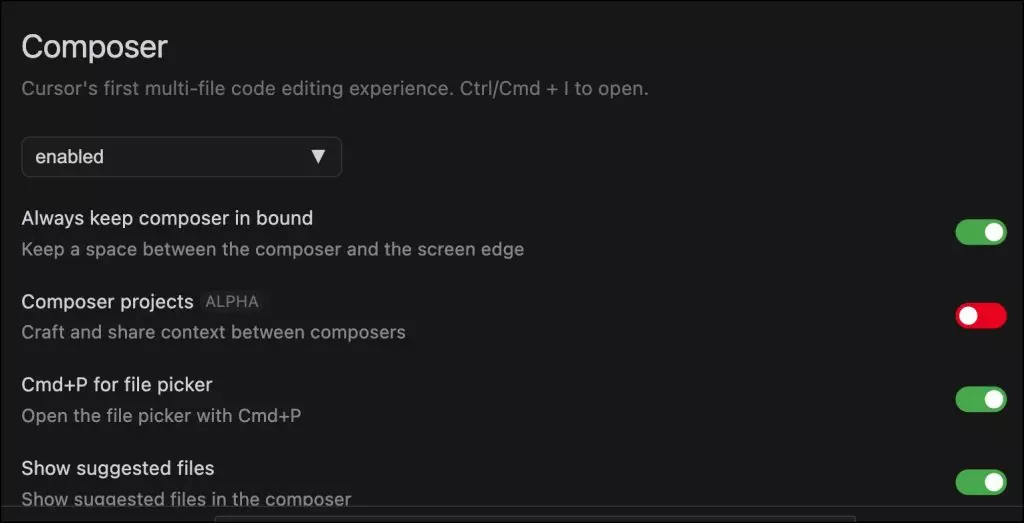
The Composer stands out as Cursor AI's most potent feature. It empowers developers to transform a product manager's specifications, written in plain English and potentially including UI mockups, directly into a fully functional application. Traditionally, the intricate process of converting conceptual designs into executable code falls to engineering teams. With Composer, this labor-intensive task is largely automated, as it intelligently generates all necessary components and artifacts required for application construction. This capability significantly streamlines the initial phases of development, accelerating time to market.

Cursor AI Composer has showcased its robust capabilities and adaptability in application development through various successful projects. Notable examples include a fully operational task manager web application and a comprehensive authentication framework, highlighting its proficiency in managing intricate software architectures. The platform's user-friendliness was notably demonstrated when an eight-year-old successfully constructed a chatbot, affirming its intuitive design. When formulating prompts, it's possible to incorporate references to various assets, such as screenshots, database schemas, and text files, along with explicit step-by-step instructions, to furnish Composer with essential contextual information. Activating Composer is simple, requiring only the Shift+Command+I hotkey, which reveals a full-screen editing interface. In my own evaluations, I successfully employed Composer to import an existing dataset into a PostgreSQL database and then expose it via a REST API endpoint. I seamlessly packaged both the database and the API layer within a Docker Compose file, executing it on my development machine without ever exiting the integrated development environment. Following successful API testing, I was able to effortlessly generate the YAML configurations necessary for deploying the application within a Kubernetes cluster.
Most existing AI coding assistants confine their utility to two primary modes: inline code suggestions within the editor and a separate, chat-like conversational interface. What truly differentiates Cursor is its groundbreaking ability to integrate the chat input box ubiquitously across the development environment. Whether you're working directly within the code editor, navigating the sidebar, or interacting with the terminal window, the chat functionality is readily available. This pervasive access provides developers with unparalleled control over their workflow, enabling seamless, context-aware assistance precisely when and where it's needed.


You can highlight a section of code and press Command+K to initiate a rewrite or refactoring, or use Command+L to display it in the sidebar, even within the terminal window. A standout feature of the chat input is its persistent history, which greatly simplifies the process of refining prompts for improved outcomes.
Cursor offers developers access to an extensive array of pre-integrated AI models, including leading options like Claude 3.5 Sonnet and GPT-4o. However, its most impressive capability lies in its support for custom models. This feature allows developers to link their existing accounts and subscriptions from providers such as Anthropic, Microsoft Azure, OpenAI, and Google, effectively bringing their own preferred models into the Cursor environment. Azure OpenAI further enhances this by providing secure, compliant private endpoints for model access.

Moreover, Cursor can be configured to interact with any OpenAI API-compatible endpoint hosting a custom model. This opens up possibilities for integrating specialized code generation models such as CodeGemma, Code Llama, or Codestral, which can be hosted on various inference engines like the Text Generation Inference server or vLLM, either on a developer's own infrastructure or through third-party services like Runpod and Fireworks AI. The platform also provides the convenience of switching between models dynamically; for example, one model might be used for executing shell commands, while another is employed for generating code, optimizing the AI's role for specific tasks.

A truly exceptional aspect of Cursor is its capacity to dynamically reference files, folders, web content, documentation, and even an entire codebase using the '@' moniker. This 'killer feature' significantly differentiates Cursor from its competitors by providing unparalleled contextual awareness to the AI. When a developer queries the codebase using '@Codebase', Cursor intelligently sifts through relevant code sections to formulate its response. Similarly, '@Files' allows specific files to be brought into context, akin to leveraging custom GPTs with specialized knowledge of proprietary code and applications.

The integration of web search via '@Web' transforms Cursor into a powerful, Perplexity-like tool, capable of retrieving answers from sources like Stack Overflow or other pertinent online resources based on the query. Crucially, the ability to incorporate documentation from any external tool is a game-changer. Cursor processes this documentation, converting it into embeddings that then inform code generation and responses to developer inquiries. For instance, I successfully integrated Chroma DB's documentation, and Cursor efficiently guided me through the processes of indexing, creating, and querying collections, demonstrating its comprehensive understanding and guidance capabilities.

One of the most compelling aspects of Cursor is its exceptional ability to manage the entire application lifecycle without requiring developers to exit the integrated development environment. While features like Composer excel in code generation, the integrated chat window within the terminal proves to be a revolutionary addition. It can generate and execute shell scripts, Docker and Kubernetes commands, and interact with other command-line tools seamlessly. In contrast to other AI coding assistants where chat responses often require manual copying and pasting, Cursor directly inserts the executable command at the prompt, significantly accelerating the workflow and reducing friction.

In a personal test, I was able to generate Dockerfiles within the editor, then build, tag, and push them to Docker Hub directly from the terminal, simply by providing natural language prompts to Cursor. After developing and testing the containers in a Docker Compose environment, I could then effortlessly deploy the application to a Kubernetes cluster in the cloud. This seamless transition from development to production, all within a unified environment, is a testament to Cursor's impressive capabilities. Cursor AI is fundamentally reshaping software development through its tightly integrated environment, adaptable features, and automated workflows. From its potent Composer tool and flexible Chat interface to its comprehensive model options, Cursor AI consistently boosts productivity and streamlines the entire development process. Its holistic methodology sets a new benchmark for AI-powered coding assistance.